
How seasons work
A season is the dated container your membership runs in — it holds your membership tiers, your members’ memberships, and a shareable registration link. Most clubs run one season per year.
Seasons are optional. A club that sells year-round memberships can skip them entirely — tiers then run on their own duration from the day each member enrolls. Reach for seasons when everyone joins and renews on the same calendar, and you want returning members to get first claim on capacity.
Every season carries two states, and they answer different questions:
- Where it sits on the calendar — upcoming, in season, ended, or archived. Memberley derives this from the season’s dates in your organization’s timezone; you never set it.
- Which registration phase it’s in — setup, renewals, waitlist, open, or closed. This one is yours to move, and it decides who can sign up.
The calendar: upcoming → in season → ended → archived
Section titled “The calendar: upcoming → in season → ended → archived”| State | Pill | What it means |
|---|---|---|
| Upcoming | Upcoming | The start date hasn’t arrived. Phases still apply, so you can run renewals and open sign-ups before the season begins. |
| In season | In season (Active on the season page) | Today falls between the start and end dates. |
| Ended | Ended | The end date has passed. The registration link stops accepting sign-ups and late fees are no longer assessed. |
| Archived | Archived | Out of service and filed away. Archiving wins over the dates — an archived season reads as archived whatever the calendar says. |
The seasons list splits on this: Current & upcoming holds the seasons you’re running, Archived holds everything retired. A season that has just ended moves to the Archived tab immediately and archives itself within the hour, so last year never lingers beside this year. Nothing about its members or history changes when it does.
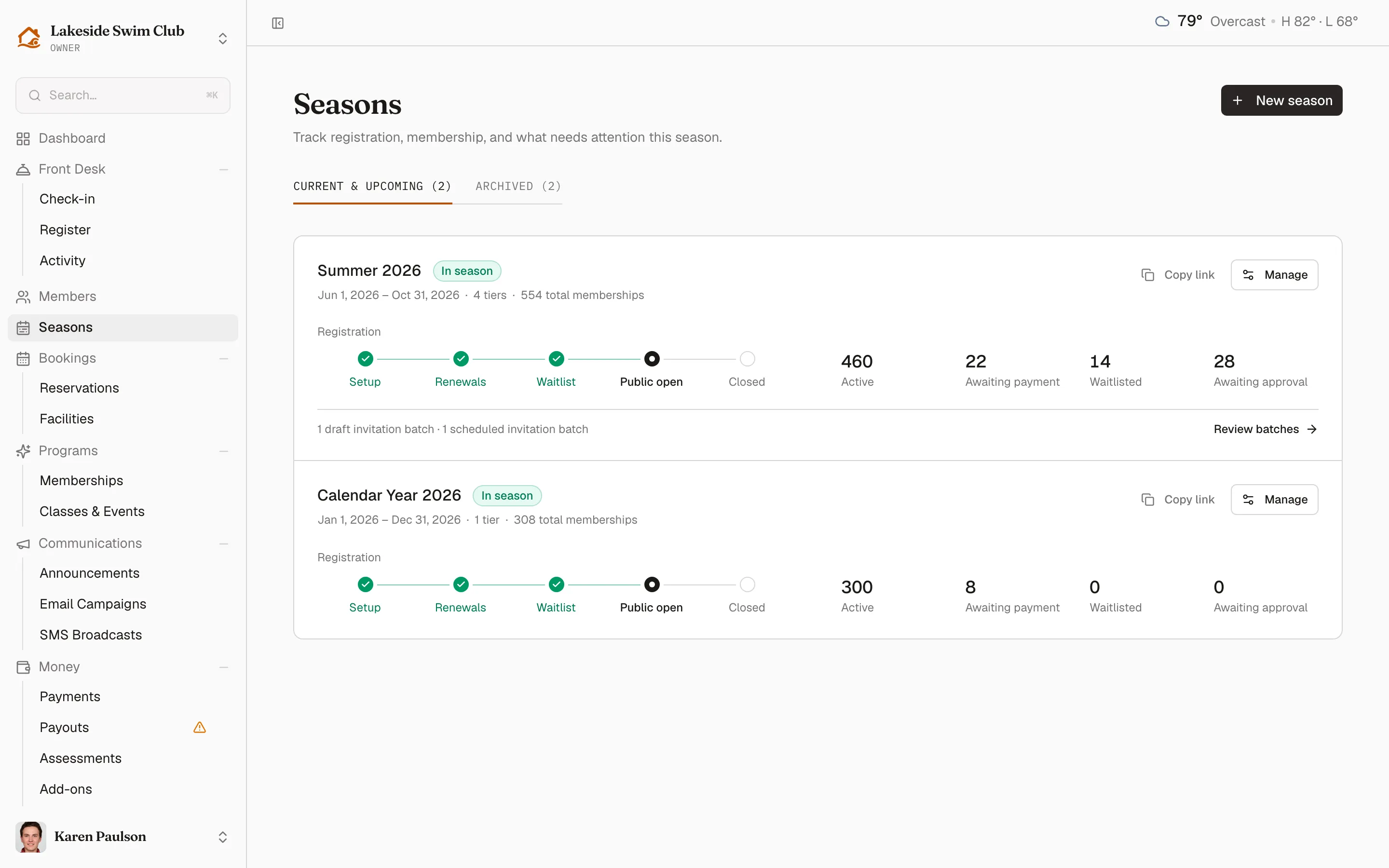
Each season you’re still running shows, on one row:
- The registration track — setup, renewals, waitlist, public open, closed — with every phase up to the current one checked off.
- The membership overview — Active, Awaiting payment, Waitlisted, and Awaiting approval counts for that season.
- What needs attention next — held invitation batches waiting to go out, no tiers attached yet, a public opening that hasn’t been scheduled — each with a link straight to the thing to do.
- Copy link, to put the registration link on the clipboard, and Manage, to open the season.
Ended and archived seasons drop all of that: their registration phase is moot, so the phase pill, the progress track, and the registration link go with it. The row keeps the name, dates, tier count, and total memberships.
The five registration phases
Section titled “The five registration phases”Phases are pure gates — moving between them never changes member data. They control exactly two things: whether the public registration link accepts sign-ups, and whether automatic waitlist promotion runs.
| Phase | Pill | What it unlocks |
|---|---|---|
| Setup | Setting up | Nothing goes out. Review tiers and dates; the registration link shows an “opens soon” notice. |
| Renewals | Renewals | The stage for releasing renewal invitations to returning members. The link still shows “opens soon”, and waitlist promotion stays paused so renewing members get first claim on capacity. |
| Waitlist | Waitlist | Automatic waitlist promotion turns on and fills any capacity renewals didn’t use. The link still isn’t accepting sign-ups. |
| Open | Open | The registration link accepts public sign-ups. Waitlist promotion keeps running. |
| Closed | Closed | The link shows a “closed” notice and waitlist promotion stops. Existing memberships are untouched. |
The order matters more than the timing: renewals before waitlist before open is what gives returning members, then the queue, then the public each their turn at a limited number of spots. A club with no capacity limits and no returning members to court can go straight from setup to open.
Closing is for stopping sign-ups early while the season still runs. You never have to close a season at the end — once the end date passes, the link closes itself.
Move a season forward
Section titled “Move a season forward”- Click Seasons in the sidebar, then Manage on the season.
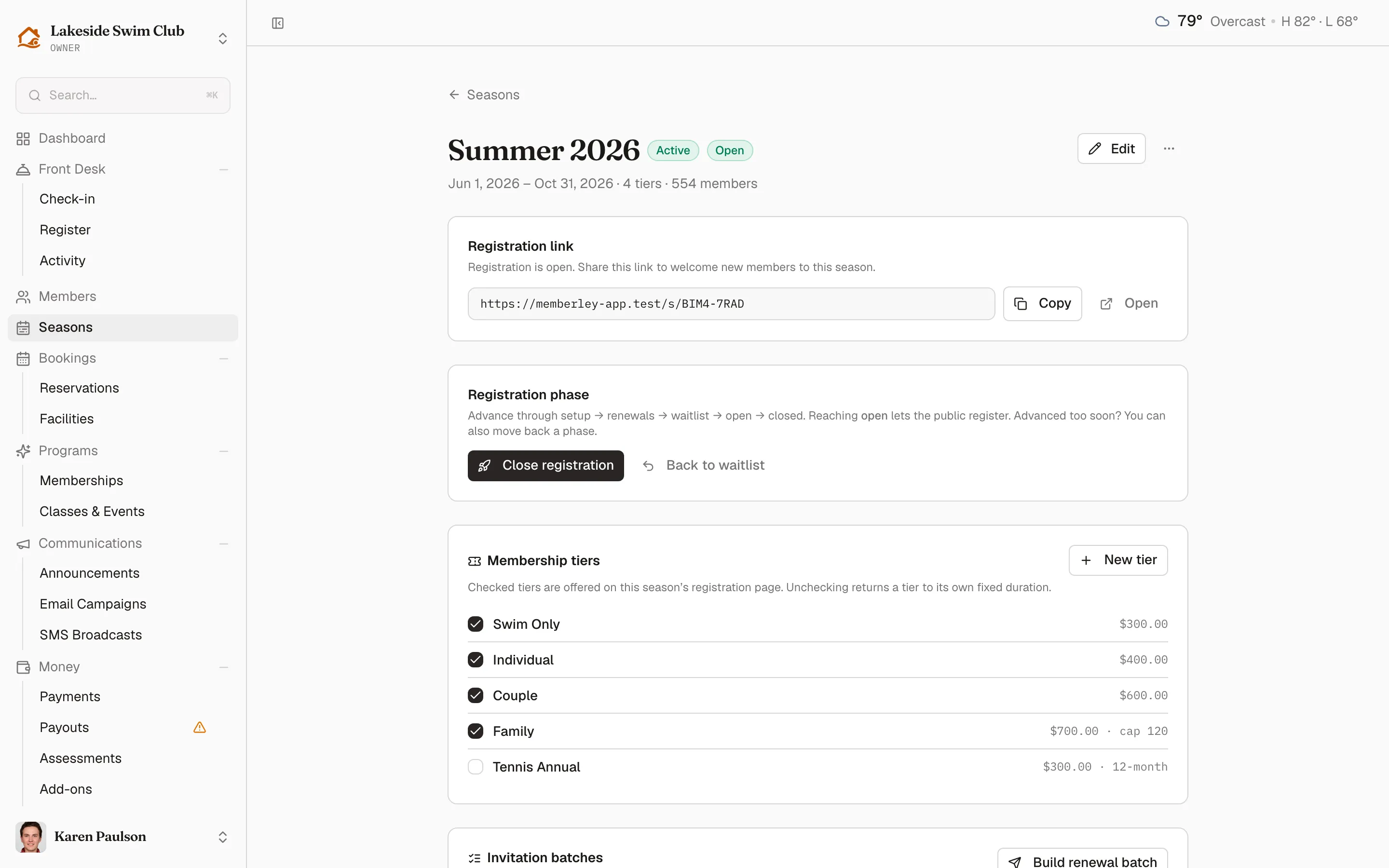
- In the Registration phase section, click the advance button for the current phase: Open renewals, then Open waitlist, then Open to public, and finally Close registration.
While a season is still working toward open, a Season kickoff — next steps checklist sits at the top of the page and walks the same phases in order, checking each one off as you advance. It knows which kind of season it’s on: a cloned season starts at “review the clone”, a club’s first season starts at “set up tiers and bring members in”. The checklist disappears once you reach open — there’s nothing left in the sequence.
There is one guard: you can’t move a season to open after its end date has passed. Memberley shows an error asking you to extend the end date first — otherwise new sign-ups would activate into an ended season and immediately expire.
Move back a phase
Section titled “Move back a phase”Advanced too soon? Each phase after setup has a move-back button — Back to setup, Back to renewals, Back to waitlist, or Reopen registration on a closed season. A confirmation dialog spells out the consequence before anything changes:
- Moving back from Open stops public sign-ups; the link shows “opens soon” instead. Waitlist promotion keeps running.
- Moving back from Waitlist pauses automatic waitlist promotion.
- Reopen registration on a closed season starts accepting sign-ups again and resumes waitlist promotion.
Renewal invitations that already went out keep working after a move back, and existing members are never affected.
Schedule public registration to open automatically
Section titled “Schedule public registration to open automatically”Instead of clicking Open to public at midnight, schedule it:
- On the season page, click Schedule open (shown while the season is in setup, renewals, or waitlist).
- In the Schedule public registration dialog, pick the Opens at time. Memberley interprets it in your organization’s timezone.
- Click Schedule.
The page then shows an Opens chip with the scheduled time; click the × on the chip to cancel. Within a few minutes of the scheduled time, Memberley advances the season to open and the link starts accepting sign-ups. Advancing to open by hand clears any pending schedule, and so does archiving the season.